


 Voice AI Agent
A customer has been routed to your IVR after waiting on hold for four minutes. They've mentioned their account number twice.
Now they're talking to your new AI voice agent that your team spent six months deploying. The agent understood the intent correctly. Its response is accurate and helpful. But there's a three-second pause between the customer's question and the agent's reply.
The customer says "Hello?" Then they press 0 for a human.
This is the gap that enterprise CX leaders rarely budget for and almost always underestimate. In messaging, a two-second delay is a mild annoyance. In a live voice conversation, it's a broken social contract. Human conversation operates on 200-300 millisecond turn-taking rhythms.
ALSO READ: A Comprehensive Guide to Voice AI Agents
When AI systems break that rhythm, they shatter the perception of intelligence, regardless of how sophisticated the underlying model is. The customer doesn't think "the AI is processing." They think this doesn't work.
Voice AI latency is the primary UX variable in enterprise conversational AI. Speed of response, which is measured in the gap between a human finishing a sentence and an AI beginning its reply, separates deployments that drive CSAT improvement from ones that quietly get shut down after six months.
This blog examines why latency compounds across the voice AI stack, where enterprise deployments most commonly break, and what it takes to build a system that feels genuinely real-time at scale.
The Latency Stack Is Deeper Than Most Teams Realize
When CX leaders talk about voice AI latency, they focus on the model. Specifically, which large language model is powering the system and how fast it generates tokens. That framing misses roughly 60% of where delay accumulates.
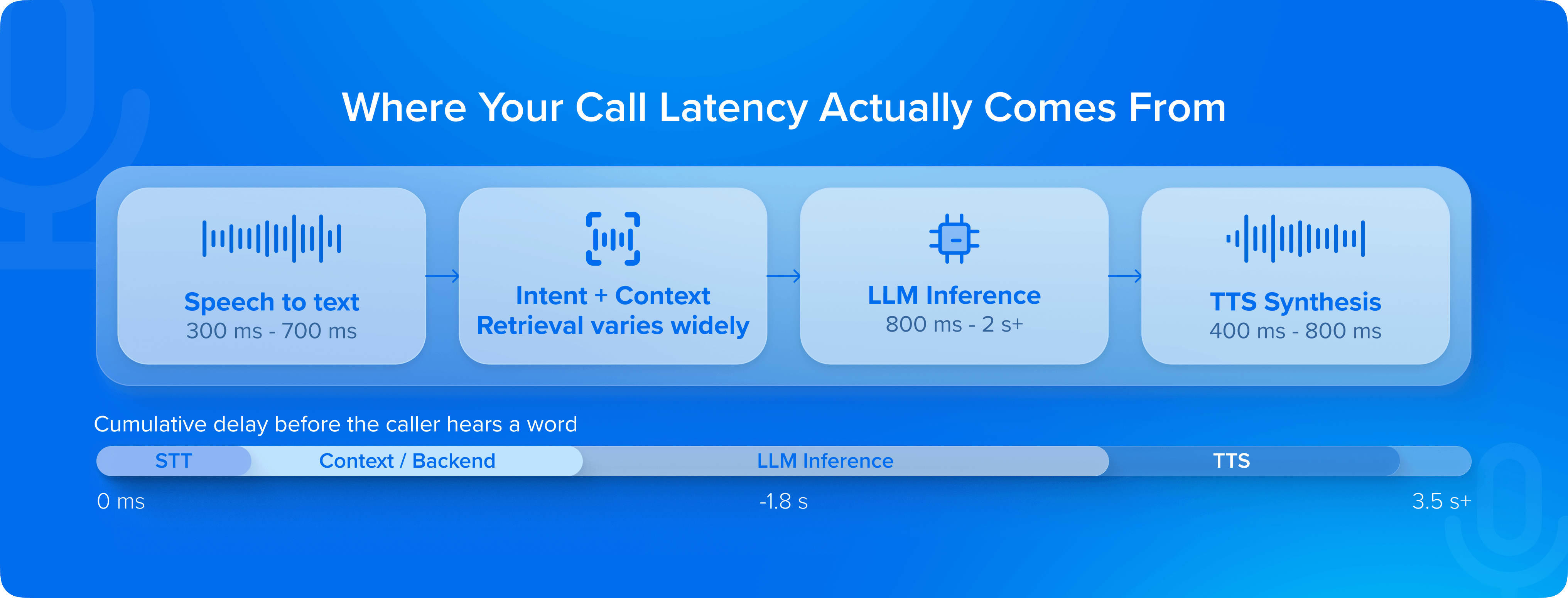
A production voice AI call involves at minimum four sequential processing layers:
- Speech-to-text (STT) transcription of the user's utterance
- Intent recognition and context retrieval
- Language model inference to generate the response
- Text-to-speech (TTS) synthesis to convert that response back to audio.
Each layer introduces latency and variance. And because these systems are pipeline-sequential by default, which means the next step cannot begin until the previous one finishes, the delays compound rather than average out.
In a typical enterprise deployment, transcription adds 300-700ms. LLM inference, depending on model size and infrastructure, adds 800ms to 2+ seconds.
ALSO READ: How to Choose the Best Voice AI Platform for Enterprise CX
TTS synthesis adds another 400-800ms. Stack those sequentially and you're already at 1.5-3.5 seconds before accounting for network round-trips, orchestration overhead, or backend system calls like fetching account data, checking policy states, querying CRMs.
Across Haptik deployments in high-volume contact center environments, we consistently find that backend integration latency is the largest single contributor to perceived conversation delay. The AI "thinks" fast. The system it's embedded in doesn't.
The implication is uncomfortable but important: optimizing only the LLM layer while leaving transcription pipelines, TTS engines, and backend integrations untouched will not produce a conversation that is natural. Latency reduction requires end-to-end architecture thinking, not model-level tweaks.
Every Millisecond of Silence Is a Vote Against Your AI
Enterprise leaders tend to measure Voice AI quality in:
- Deflection rates
- Containment rates
- Resolution accuracy.
While those metrics matter, they're lagging indicators that reveal what happened after the experience was formed. Latency is a leading indicator of all of them.
The research on conversational turn-taking is unambiguous: humans begin interpreting a pause as communicative failure after approximately 700 milliseconds.
ALSO READ: Beyond Accuracy: The 7 Metrics That Actually Define Voice AI Performance
By 1.5 seconds, a meaningful percentage of callers interpret the silence as a dropped connection or system error. By 3 seconds, the instinct to escalate to a human agent, or simply hang up, kicks in for most users.
What this means in practice is that your AI can have 95% intent recognition accuracy, but if it consistently pauses for 2.5 seconds before responding, your CSAT scores will reflect a broken experience.
This dynamic is especially acute in certain verticals.
In BFSI, where customers are often calling about account disputes, EMI schedules, or fraud alerts - anxiety is elevated. A long pause in that context feels like uncertainty.
In insurance claims and healthcare scheduling, the same pattern applies. Across these high-stakes, high-sensitivity deployment contexts, Haptik's field experience consistently shows that driving response latency below the 800ms threshold produces measurable improvements in containment and customer-reported satisfaction.
Where Enterprise Voice AI Deployments Break
There's a version of voice AI latency that's a configuration problem:
- Wrong instance sizes
- Suboptimal model deployment
- Unoptimized TTS settings
That's fixable in days. The harder version is structural, which most enterprise deployments encounter after they move from pilot to production.
At scale, several failure modes emerge simultaneously.
Concurrent session management
A voice AI system handling 50 test calls behaves differently from one handling 5,000 simultaneous calls during a post-billing-cycle spike. Infrastructure that isn't designed for horizontal elasticity will degrade under peak load, and degradation almost always manifests first as latency spikes.
Context retrieval at scale
Enterprise voice AI isn't stateless. Every turn in a conversation requires pulling prior context, customer history, and relevant policy data. The database queries that execute in 40ms during a pilot with clean, indexed data can balloon to 400ms in a production environment with years of accumulated records, distributed data sources, and middleware layers that weren't designed for real-time retrieval.
Multilingual and accent variability
Enterprises deploying voice AI whether across Indian language variants, Southeast Asian markets, or global customer bases, face transcription accuracy degradation on non-standard accents that directly produces perceived latency. When a customer has to repeat themselves, the effective conversation latency is the entire re-utterance cycle.
Streaming Is Not a Feature. It Is the Architecture
The most significant shift in enterprise voice AI design over the past 18 months isn't a new model capability. It's streaming, and specifically, the shift from batch-response architectures to streaming-first pipelines where TTS begins synthesizing audio before the LLM has finished generating the full response.
In a batch architecture, the system waits for the complete LLM output before beginning speech synthesis. This maximizes coherence - the TTS engine knows the full sentence before speaking it - but it stacks the latency of inference and synthesis sequentially.
In a streaming architecture, the LLM begins generating tokens and the TTS engine begins converting the first complete phrase to audio in parallel, while the model continues generating. The result is that the customer begins hearing the response within 400-600ms, even if the full response takes 2 seconds to generate.
READ: The Enterprise Guide to Testing Voice AI Agents: From Sandbox to Production
The tradeoff is real: streaming architectures require more sophisticated orchestration, careful sentence boundary detection, and handling for cases where mid-stream context changes the tone or content of a response.
These are solvable engineering problems, but they require teams who have deployed streaming pipelines in production, not just evaluated them in demos. Haptik's voice AI infrastructure is built streaming-first precisely because at enterprise-scale, the batch architecture ceiling is so low it simply cannot produce the conversational feel that drives adoption in high-volume deployments.
Measuring Latency the Right Way
Most enterprise teams measure average response time. That's the wrong metric for a conversational system. Average response time hides the moments that destroy experience quality.
The metric that matters is P95: the response time at the 95th percentile of your call volume. If your average response time is 800ms but your P95 is 3.2 seconds, you are delivering a broken experience to 5% of your calls.
At 10,000 calls per day, that's 500 customers per day experiencing conversation-breaking delays. Average latency looks fine. CSAT doesn't.
Beyond P95, enterprise teams should track two additional signals.
Turn completion rate
It measures the percentage of AI turns completed before the caller attempts to speak again or presses a keypad interrupt — a low rate is a direct latency signal, not a content problem.
Time-to-first audio
This metric tracks the elapsed time from the end of the customer's utterance to the first millisecond of synthesised speech output.
Together, these metrics offer a complete picture of the real-time conversational experience, not the sanitised average that looks fine in a weekly report.
The Standard Is Set by the Best Human Agent
Here is the reframe that most enterprise conversations about Voice AI latency miss: the benchmark your customers are comparing against is not other IVR systems or other AI deployments. It is the fastest, most fluent human agent they've spoken to - the one who listened, paused for half a second, and said exactly what they needed to hear.
That's the standard. Not because it's fair - human agents have context and intuition that AI systems are still developing - but it's the experiential reality your customers carry into every call.
The teams winning in enterprise Voice AI aren't the ones with the most sophisticated models. But it’s those who've treated latency as a first-class product requirement from day one. That decision is made in the architecture, months before the first call is handled. And it's very difficult to undo after the fact.
Get a glimpse of how Haptik engineers response times to elevate Voice AI-led CX. Book your demo now.

source on Google